QMS Software: How to Choose the Right Quality Management System
Quality management system (QMS) software, often called eQMS, replaces the binders, shared drives and spreadsheets that hold documents, nonconformances, CAPAs, audits and training records. Done well, it makes the quality system easier to follow and easier to prove. Done badly, it adds clicks without improving quality. This guide compares the options and sets out the criteria that matter.
What QMS software covers
A quality management system is the set of processes an organization uses to meet customer and regulatory requirements and improve. Software does not create a QMS; it hosts the records and workflows. Most products are built from the same modules:
- Document control: drafting, review, approval, release and retirement of procedures and forms, with version history.
- Nonconformance (NCR) and deviations: logging problems, containment and disposition.
- CAPA: corrective and preventive actions, root cause, effectiveness checks.
- Audits: internal and supplier audit planning, findings and follow-up.
- Training: linking roles to required documents and recording competence.
- Supplier quality, complaints and change control.
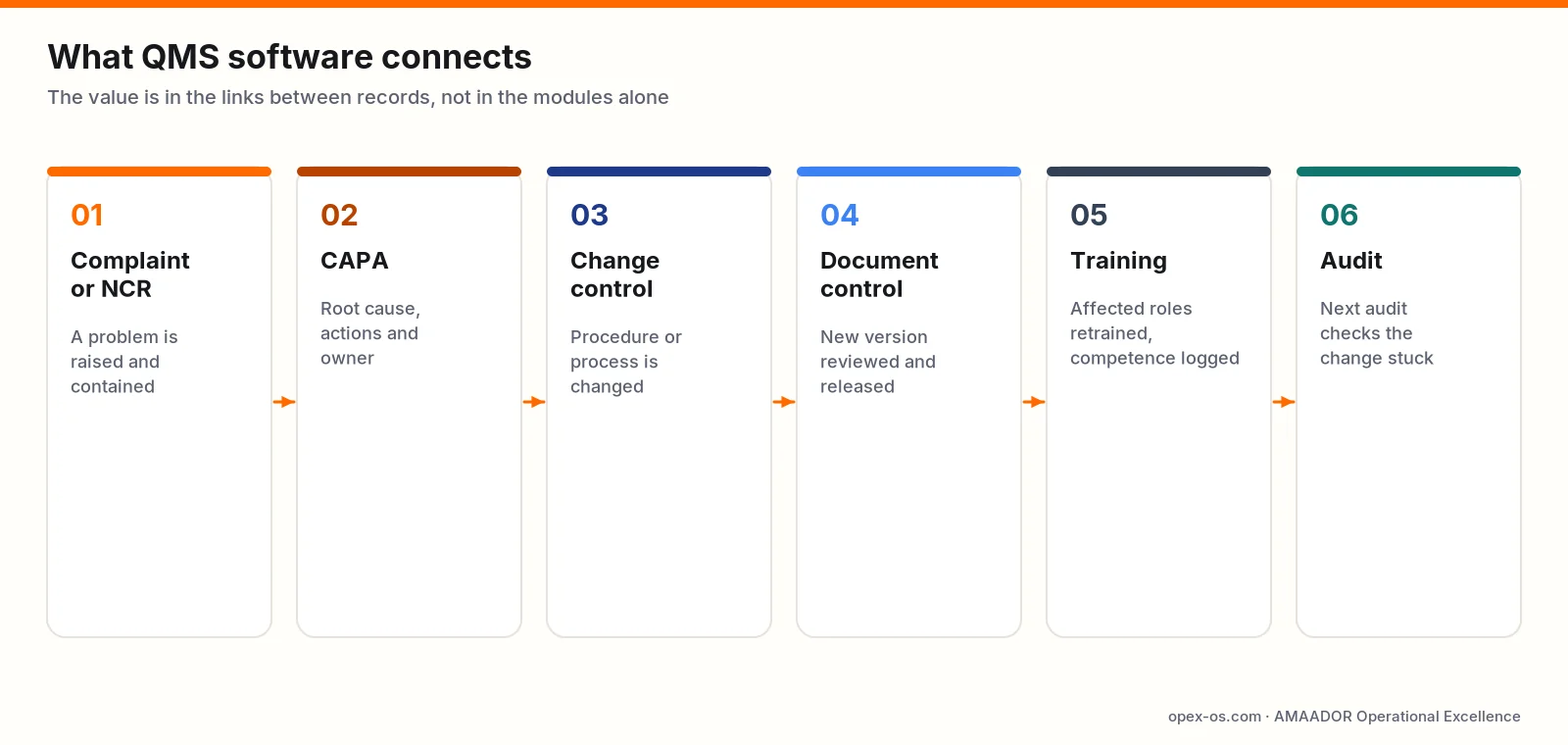
The value is in the links. A complaint opens a CAPA; the CAPA changes a procedure; the change triggers retraining for the affected roles; the next audit checks that it stuck. On paper those links depend on someone remembering.
Regulatory context worth knowing
If you make medical devices for the US market, the rules changed in 2026. The US Food and Drug Administration states that its Quality Management System Regulation (QMSR) became effective on February 2, 2026. It amends the device current good manufacturing practice requirements in 21 CFR Part 820 and incorporates by reference ISO 13485:2016, the international standard for medical device quality management systems. On the same date the FDA began using an updated inspection compliance program (7382.850).
For electronic records, FDA's guidance on 21 CFR Part 11 explains that the agency interprets the scope of Part 11 narrowly and intends to exercise enforcement discretion on certain requirements, including audit trail requirements, while predicate rules still apply. It also describes enforcement discretion for legacy systems that were operational before August 20, 1997, the effective date of Part 11. In practice, regulated buyers should ask vendors exactly how audit trails, electronic signatures and validation are handled, and keep their own risk assessment.
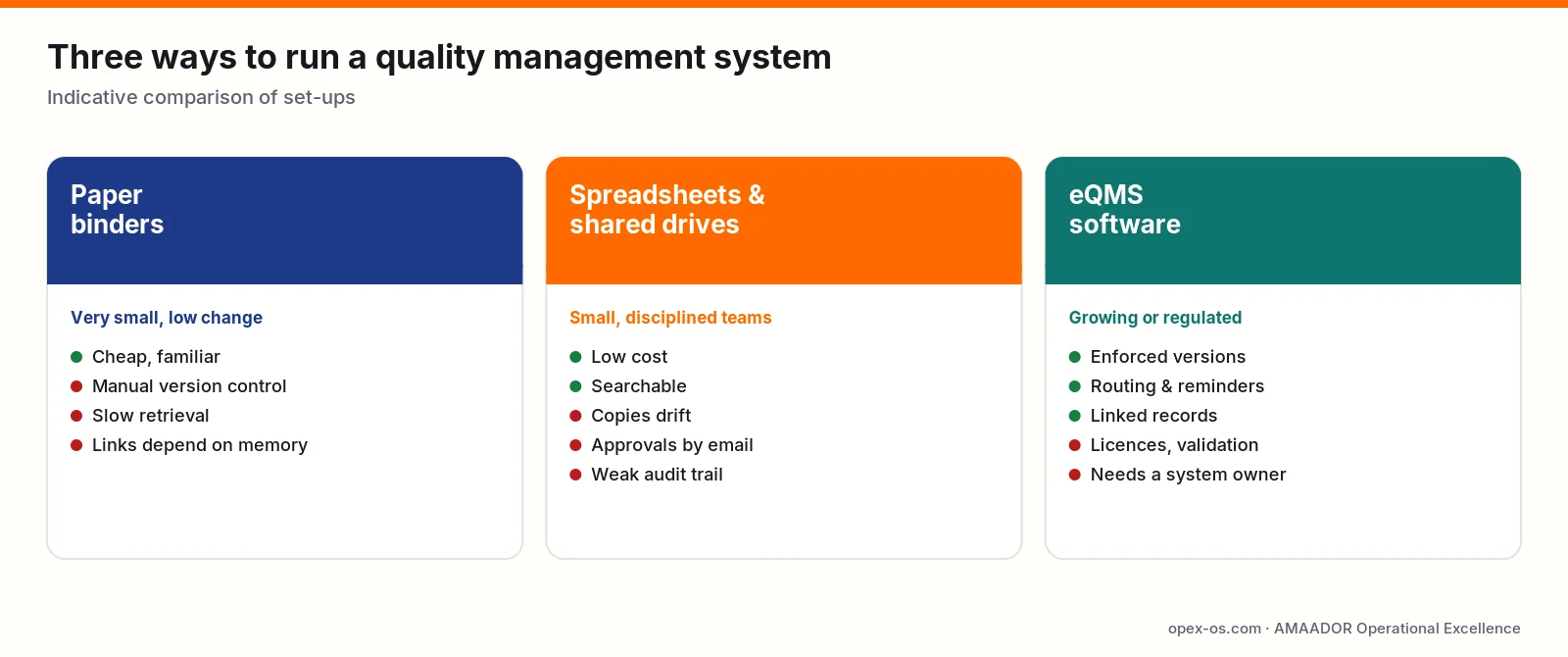
Paper vs spreadsheets vs eQMS
| Criterion | Paper binders | Spreadsheets and shared drives | eQMS software |
|---|---|---|---|
| Version control | Manual stamps and recalls | Easy to break (copies, local files) | Enforced, with history |
| Workflow and approvals | Physical routing | Email chains | Built-in routing and reminders |
| Links between records | Memory and cross-references | Hyperlinks if maintained | Native (complaint to CAPA to change to training) |
| Audit readiness | Slow retrieval | Depends on discipline | Search and reports |
| Cost to start | Low | Low | Licences, configuration, validation |
| Best fit | Very small, low-change operations | Small teams with strong discipline | Growing, multi-site or regulated operations |
Indicative comparison of approaches, not of specific products.
Selection criteria
- Fit to your processes and standard. ISO 9001, IATF 16949, ISO 13485 and food standards each stress different records. Ask for a demonstration of your own CAPA or change-control flow, not a generic one.
- Configurability without code. Forms, fields and workflows will change. Check who can change them and whether changes need revalidation.
- Usability on the floor. Operators should be able to raise a nonconformance from a tablet in under a minute; otherwise problems stay on paper.
- Integration. Links to ERP (items, suppliers), MES or inspection data, and HR (people, roles) reduce double entry.
- Data ownership and export. Make sure you can export all records in usable formats if you leave.
- Validation support for regulated users: documentation, test scripts and release notes.
- Total cost over five years, including internal administration.
Pros and cons of moving to an eQMS
Pros: one controlled version of each document, automatic routing and reminders, linked records, faster audits and better trend analysis of nonconformances and complaints.
Cons: configuration and migration effort, validation burden in regulated sectors, subscription costs, and the risk of copying a bloated paper system into software. Simplify procedures before you migrate them.
Rollout approach
Most teams start with document control and training records, because every other module depends on them, then add NCR and CAPA. Before migration, run a document register clean-up with the document register tool, retire duplicates and agree a file naming convention. Test the CAPA flow with real cases using the CAPA tracker and the 8D Pre-Check so the software reflects how good problem solving actually works, as described in our A3 problem-solving guide.
Metrics that show it is working
- Median days to close a CAPA, and the share closed with a verified effectiveness check.
- Overdue document reviews and overdue training assignments.
- Repeat nonconformances on the same part or process.
- Audit findings related to document or record control.
Questions to ask in every demo
Generic demonstrations always look smooth. Bring three real cases instead: a supplier nonconformance that needed a deviation, a customer complaint that led to a design or process change, and a procedure revision that affected several roles. Ask the vendor to walk each case end to end in the system and count the screens, clicks and manual hand-offs. Then ask:
- How does a released document reach the people who must read it, and how is that recorded?
- What happens to open training assignments when a document is revised again before people finish?
- Can a CAPA be closed without an effectiveness check, and who can override that?
- How are records retained and exported, and in which formats?
- What is in the standard product, and what would be custom configuration we must maintain?
Build, configure or buy?
Some teams build quality workflows on general low-code or collaboration platforms. That can work for small scopes, but you take on version control, audit trail design, validation and long-term support yourself. A packaged eQMS costs more up front and limits flexibility, but much of the record-control logic is already built and documented. A practical rule: the more regulated your products and the more sites you have, the stronger the case for a packaged system; the smaller and simpler the operation, the more a well-governed shared drive and a few good templates can carry you.
Common mistakes
- Buying for the audit, not for the people who raise and fix problems.
- Migrating hundreds of obsolete documents instead of reviewing them first.
- Leaving CAPA effectiveness checks optional, which turns the module into a filing system.
- Not assigning a system owner with time to administer it.
Related free tools
Sources and further reading
- FDA: Quality Management System Regulation (QMSR)
- FDA guidance: Part 11, Electronic Records; Electronic Signatures, Scope and Application
Frequently asked questions
What is the difference between a QMS and QMS software?
Does ISO 9001 require QMS software?
What changed for medical device makers in 2026?
Which module should we implement first?
Put it into practice
Free calculators and procedure generators for maintenance, reliability and continuous-improvement teams.
Explore the free tools →