Generative AI for SOPs and Work Instructions: A Safe Workflow
Generative AI can turn a messy expert walkthrough into a clean, structured work instruction in minutes. It can also invent a torque value or drop a lockout step with complete confidence. The difference is the workflow around it. This guide shows how to use AI to draft SOPs and work instructions while keeping the people who do the work in charge of what is correct, and how to manage the risks NIST highlights for generative AI.
Where AI helps, and where it must not decide
Writing good work instructions is slow. Experts know the job but rarely enjoy writing; documents drift out of date; translations lag. Generative AI is genuinely useful for the writing part: structuring steps, simplifying language, producing consistent formats, drafting translations, and turning interview notes or transcripts into a first draft.
What it cannot do is know your equipment, your hazards or your specification. Those facts must come from your sources and your experts, and every safety-critical detail must be verified by a competent person. Treat the model as a fast junior writer, not as an authority.
The risk picture: NIST AI 600-1
In July 2024 NIST published NIST AI 600-1, Artificial Intelligence Risk Management Framework: Generative Artificial Intelligence Profile, a companion to the AI RMF 1.0 (released January 2023 for voluntary use). It describes 12 risks that are unique to or made worse by generative AI. Several map directly onto documentation work:
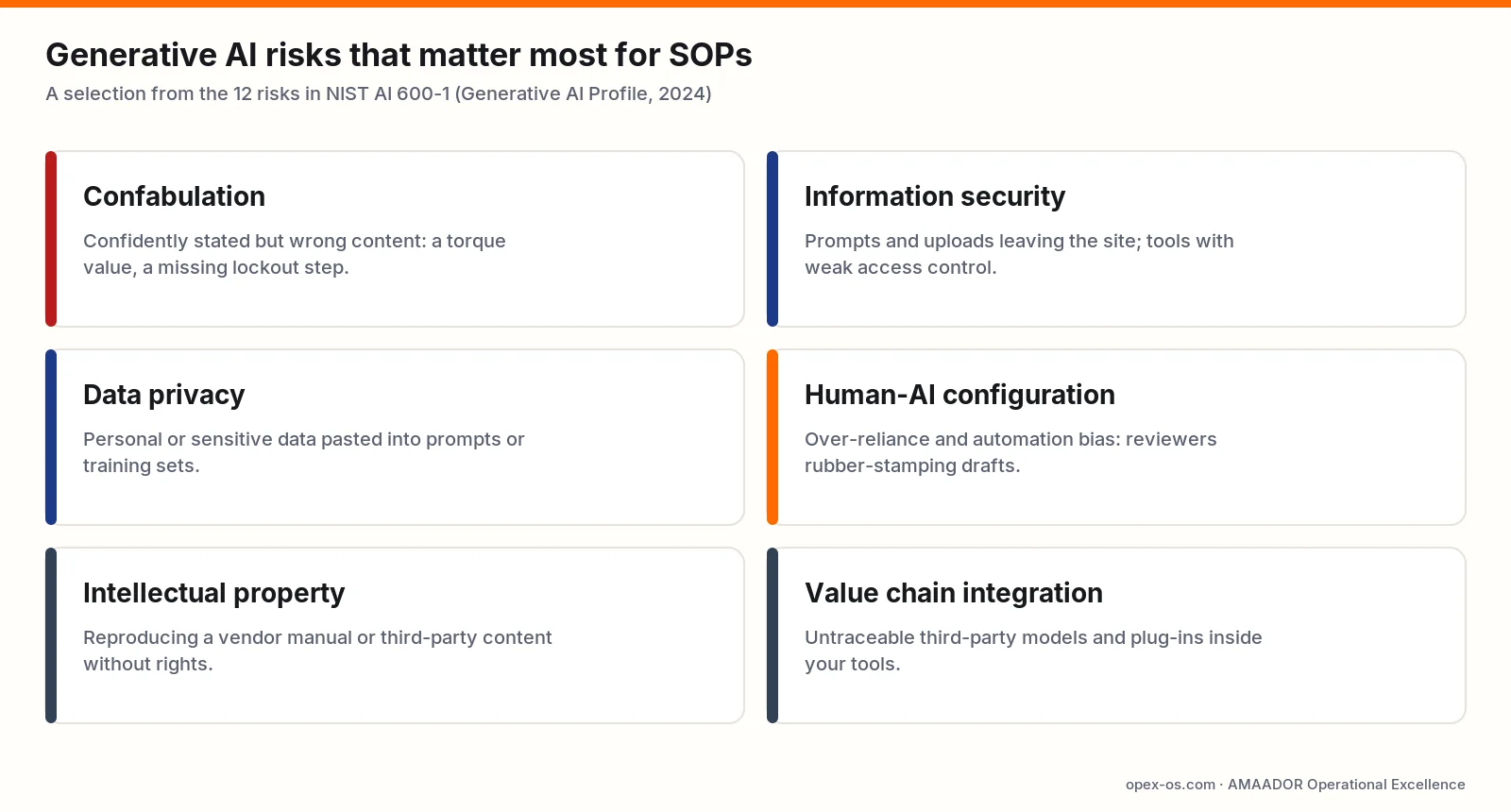
- Confabulation: NIST defines it as the production of confidently stated but erroneous or false content, colloquially "hallucinations". In an SOP this could be a wrong setting, a step that does not exist on your machine, or a missing check.
- Human-AI configuration: NIST includes automation bias and over-reliance. Reviewers who see a polished draft tend to approve it.
- Data privacy and information security: what you paste into a tool may leave your control; use approved tools and keep sensitive data out of prompts.
- Intellectual property: do not reproduce vendor manuals or third-party content without the right to do so.
A controlled workflow
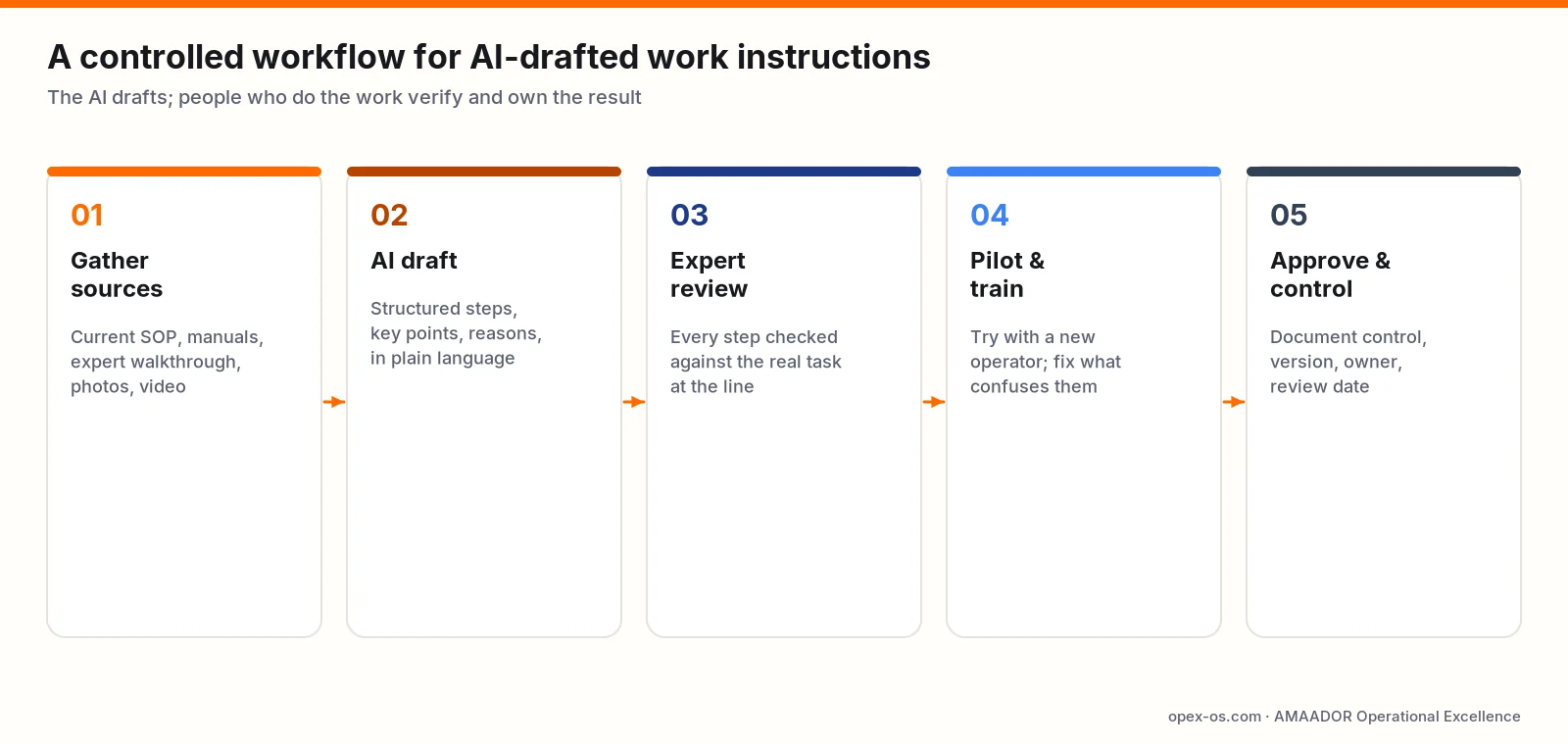
- Gather the sources. The current SOP, OEM manual sections you are entitled to use, the risk assessment, photos, and a recorded walkthrough by an experienced operator.
- Draft with AI from those sources only. Instruct the model to use only the material provided, to mark anything it is unsure about as "VERIFY", and never to invent values.
- Expert review at the workplace. An experienced operator and a supervisor or engineer walk the draft step by step at the machine. Every number, sequence and safety step is checked against reality.
- Pilot with a newcomer. Ask someone who has not done the job to follow the draft under supervision. Wherever they hesitate, the instruction is unclear.
- Approve and control. Release through your normal document control: owner, version, approval, effective date and review date. Note that AI was used in drafting if your quality system requires it.
The free Work Instruction generator and SOP generator give you a consistent structure to fill, whether the first draft comes from a person or from AI.
A prompt pattern that works
Good prompts constrain the model. A useful pattern: state the role ("You are drafting a work instruction for trained operators"), provide the sources, define the format (numbered important steps, key points for quality and safety, the reason for each key point), require plain language at a set reading level, and forbid invention ("If information is missing, write VERIFY and continue"). The "important step / key point / reason" structure comes from the Training Within Industry job instruction method and suits AI drafting well because it separates what to do from how to do it right.
Capturing expert knowledge before it leaves
The biggest value is often not formatting but capture. Many plants depend on a few experienced people whose know-how was never written down. Record them explaining a task, transcribe, and use AI to draft; then let them correct the draft. The paid Know-how kit is built for exactly this: bringing new people up to speed over 30 shifts, signing off each skill with a buddy, and capturing what experts know before they leave.
Keeping instructions current
AI also helps with maintenance of documents, which is where most SOP systems fail. When a machine, material or specification changes, give the model the old instruction and the change note, and ask it to list every step affected and propose redlines. The expert still decides, but the search for affected steps becomes faster. Linking instructions to the equipment and change records in your CMMS or quality system makes it easier to find which documents a change touches.
Visual instructions and translations
Good work instructions show more than they tell. Use photos or short clips for each important step, with the key point visible. AI can draft captions and callouts, but the picture must come from your own workplace. For multilingual workforces, AI translation is a fast first draft; have a bilingual operator check technical terms and safety wording, because a fluent translation can still be wrong about the meaning of a step.
Measuring whether it worked
Track the outcomes the instructions are meant to improve: time for a newcomer to reach standard performance, first-pass yield on the task, errors traced to unclear instructions, and how quickly documents are updated after a change. If AI drafting speeds up writing but these numbers do not move, the bottleneck is elsewhere, often in review, training or the standard itself.
What to keep human
- Hazard identification and lockout/tagout steps.
- Acceptance criteria, settings and tolerances.
- Final approval and ownership of the document.
- Training sign-off: the instruction is not finished until someone can do the job from it.
Common mistakes
- Publishing the first draft because it looks professional.
- Using public tools with confidential data, against company policy.
- No source control: nobody can tell which facts came from where.
- Skipping the newcomer test, so clarity problems surface on the night shift.
Related free tools
Sources and further reading
- NIST AI 600-1: Generative Artificial Intelligence Profile (2024)
- NIST: AI Risk Management Framework
- Lean Enterprise Institute: Standardized Work
Frequently asked questions
Can AI write SOPs?
What is AI confabulation?
What is NIST AI 600-1?
Should AI-drafted documents go through document control?
Put it into practice
Free calculators and procedure generators for maintenance, reliability and continuous-improvement teams.
Explore the free tools →